Saturday, August 11, 2012

Customizing the Search results UI in SharePoint 2013 Preview - Introduction

Quote Steve Peschka (MS): "SharePoint 2013 has a number of outstanding features that allow you to really use and customize search results like never before." ...
"In SharePoint 2013 – queue the music – we have display templates and what an improvement they are. No longer do you need to carry your XSLT Zen about you, now you can create your custom display code as straight HTML – yahoo!"

So let's try to find out how we are able to customize the search results user interface in the following web parts:
  1. Refinement web part: show associated icons in front of the File extension refiner filters (part 1);
  2. Refinement web part: show associated icons in front of the Result type refiner filters (part 2);
  3. Search Results web part: add tumbnail view to the Display Template of the Result Type for images (part 3);
  4. Hover Panel: add extra action to open the edit form of the item (part 4).

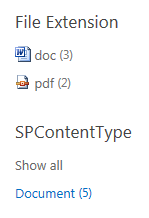
Preview of the customized Refinement panel:

Part 1 will explain in detail how this can be done.

Saturday, July 28, 2012

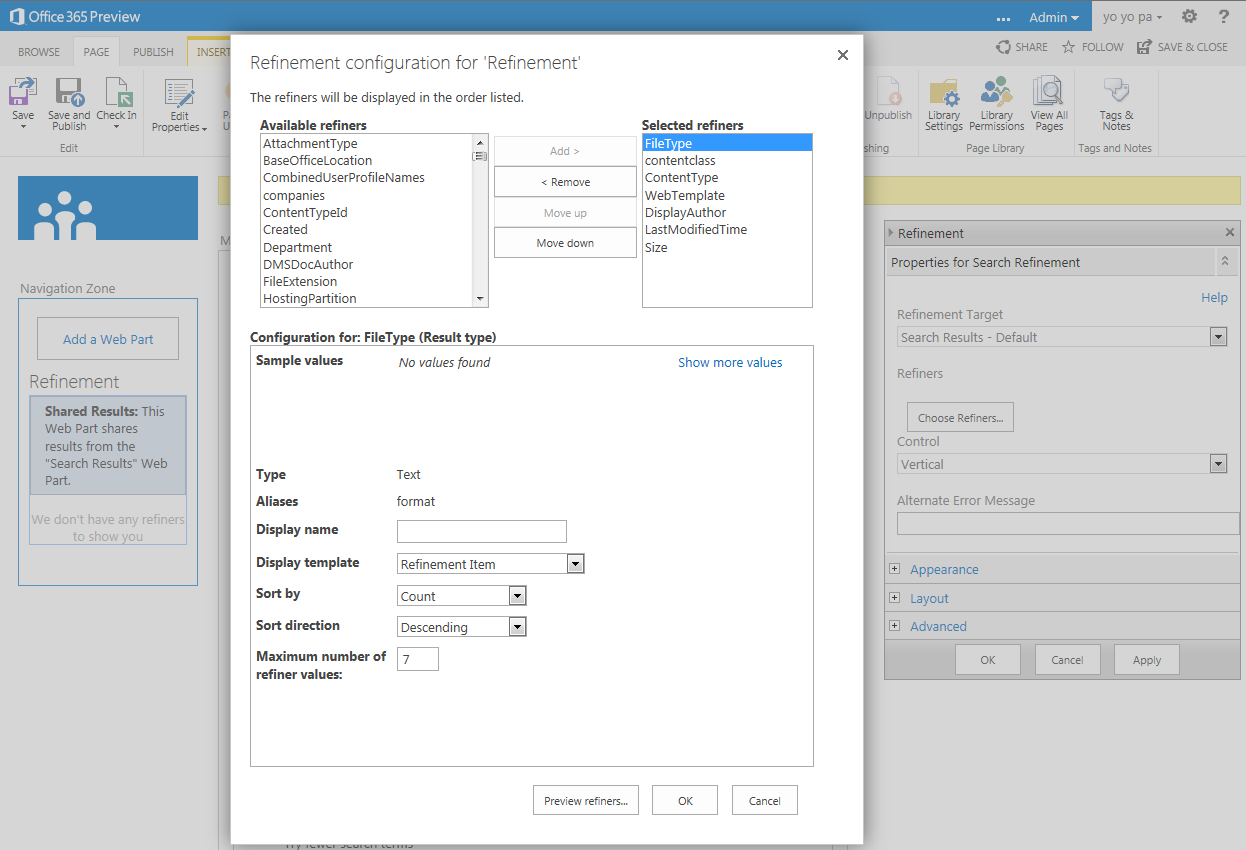
Refiners in SharePoint 2013 Preview

Here is a preview of the Refinement panel in SharePoint 2013. Custom refiners can be added through the user interface:


Display of the refiners in the search results page:


This impression is based on an Office 365 Developer Site.

Wednesday, July 11, 2012

Tip 4all@DIWUG: free SharePoint wireframing and prototyping

Tonight my alter ego attended the DIWUG event in Amsterdam. Here is my tip for free SharePoint wireframing and prototyping: Intranet Modeler for SharePoint by IntranetFactory. Their SharePoint Factory produces your custom SharePoint site automatically. SharePoint Factory takes the wireframe model that you created and generates your complete SharePoint Site and your personal implementation guide.

Tuesday, June 5, 2012

Search Refinement Panel is not so MUI after all

"Out of the box SharePoint 2010 offers a search refinement panel that works great as long as you don’t use multiple languages. After some testing with search and the refinement panel I noticed that the Managed Metadata wasn’t changing when I was switching languages."
Ventigrate offers a MUI Search Refinement Panel on CodePlex.
Read more on Timmy Gilissen's blog: http://www.moss2007.be/blogs/timmy/archive/2011/12/13/mui-refinement-panel.aspx

Wednesday, February 29, 2012

Select multiple Refiners via the UI with xsl & js (part 2)

Just by extending the XSL of the Refinement Panel and adding a little javascript it is possible to select multiple Refiners via the UI:


After selection of multiple Refiners:


Add the following javascript to the Search results page:
<script type="text/javascript">
function Filter(url)
{
var inputs = document.getElementsByTagName("input");
var idValues = [];
for (var i = 0; i < inputs.length; i++) {   
  if ((inputs[i].type == "checkbox") && (inputs[i].checked)) {
idValues.push((GetUrlKeyValue("r",false,inputs[i].value)).substr((GetUrlKeyValue("r",false,url)).length));
}}
window.location = SP.Utilities.UrlBuilder.replaceOrAddQueryString(url, "r", GetUrlKeyValue("r",false,url)+decodeURI(idValues.toString().replace(/\,/g,"%20")));
}
</script>
(2012-03-01) Correction: changed the boolean value in all three GetUrlKeyValue functions to false.

Extend the XSL of the Filterlink template in the Refinement Panel web part:
  <xsl:template name="FilterLink">
    <xsl:param name="Url"/>
    <xsl:param name="UrlTooltip"/>
    <xsl:param name="Value"/>
    <xsl:param name="FilterSelection"/>
    <xsl:param name="ShowCounts"/>
    <xsl:param name="Count"/>
    <xsl:param name="Percentage"/>
    <xsl:param name="Indentation"/>
    <!-- HW -->
    <xsl:param name="ManagedProperty" />
    <!-- HW -->
    <xsl:variable name="SecureUrl">
      <xsl:call-template name="GetSecureUrl">
        <xsl:with-param name="Url" select="$Url" />
      </xsl:call-template>
    </xsl:variable>
    <li class="ms-searchref-filter {$FilterSelection}">
      <xsl:if test="($Indentation = '1')">
        <span class="ms-searchref-indenticon">&#8627;&#160;</span>
      </xsl:if>
      <!-- HW -->
      <xsl:if test="($ManagedProperty = 'Author' or $ManagedProperty = 'FileExtension') and $FilterSelection != 'ms-searchref-unselected' and not(starts-with($Value, 'Any '))">
        <input name="{$Value}" type="checkbox" align="center" title="OR {$Value}" value="{$SecureUrl}" checked="yes" />
      </xsl:if>
      <xsl:if test="($ManagedProperty = 'Author' or $ManagedProperty = 'FileExtension') and $FilterSelection = 'ms-searchref-unselected' and not(starts-with($Value, 'Any '))">
        <input name="{$Value}" type="checkbox" align="center" title="OR {$Value}" value="{$SecureUrl}" />
      </xsl:if>
      <xsl:choose>
        <xsl:when test="(starts-with($Value, 'Any Result Type') or starts-with($Value, 'Any Author')) and $FilterSelection != 'ms-searchref-unselected'">
          <a href="javascript:Filter('{$SecureUrl}')"><img align="absmiddle" src="/_layouts/images/filter.gif" border="0" title="Join selected Refiners"/></a>
        </xsl:when>
        <xsl:when test="(starts-with($Value, 'Any Result Type') or starts-with($Value, 'Any Author')) and $FilterSelection = 'ms-searchref-unselected'">
          <a href="{$SecureUrl}"><img align="absmiddle" src="/_layouts/images/filteroff.gif" border="0" title="Reset selected Refiners"/></a>
        </xsl:when>
        <xsl:when test="starts-with($Value, 'Any ')">
          <img align="absmiddle" src="/_layouts/images/asterisk.png" border="0" />
        </xsl:when>
        <xsl:when test="$ManagedProperty = 'SiteName'">
          <a href="http://{$Value}" target="_blank" title="Open site in new window"><img align="absmiddle" src="/_layouts/images/SharePointFoundation16.png" border="0" /></a>
        </xsl:when>
        <xsl:when test="ddwrt:MapToIcon('', $Value) != 'icgen.gif'">
          <img align="absmiddle" src="/_layouts/images/{ddwrt:MapToIcon('', $Value)}" border="0" />
        </xsl:when>
        <xsl:when test="$Value = 'Word'">
          <img align="absmiddle" src="/_layouts/images/icdocx.png" border="0" />
        </xsl:when>
        <xsl:when test="$Value = 'Excel'">
          <img align="absmiddle" src="/_layouts/images/icxlsx.png" border="0" />
        </xsl:when>
        <xsl:when test="$Value = 'PowerPoint'">
          <img align="absmiddle" src="/_layouts/images/icpptx.gif" border="0" />
        </xsl:when>
        <xsl:when test="$Value = 'Webpage'">
          <img align="absmiddle" src="/_layouts/images/icaspx.gif" border="0" />
        </xsl:when>
        <xsl:when test="$ManagedProperty = 'Author'">
          <a href="/SearchCenter/Pages/peopleresults.aspx?k={$Value}" target="_blank" title="Search for user profile"><img align="absmiddle" src="/_layouts/images/ACA16.gif" border="0" /></a>
        </xsl:when>
        <xsl:otherwise>
          <img align="absmiddle" src="/_layouts/images/{$Value}.gif" onError="this.src='/_layouts/images/bullet.gif';" border="0" />
        </xsl:otherwise>
      </xsl:choose>
      <xsl:text> </xsl:text>
      <!-- HW -->
      <a class="ms-searchref-filterlink" href="{$SecureUrl}" title="{$RefineByHeading}: {$UrlTooltip}">
        <xsl:value-of select="Value"/>
      </a>
      <xsl:choose>
        <xsl:when test="($ShowCounts = 'Count') and ($Count != '')">
          <span class="ms-searchref-count">
            <xsl:if test="$IsRTL = 'True'">&#x200f;</xsl:if> 
            (<xsl:value-of select="Count"/>)
          </span>
        </xsl:when>
        <xsl:when test="($ShowCounts = 'Percentage') and ($Percentage != '')">
          <span class="ms-searchref-count">
            <xsl:if test="$IsRTL = 'True'">&#x200f;</xsl:if> 
            (<xsl:value-of select="format-number($Percentage, '0%')"/>)
          </span>
        </xsl:when>
      </xsl:choose>
    </li>
  </xsl:template>

That's all folks!

Notice: The Display Language should be English, because I check for the word 'Any' in the XSL. You can/should adjust this by yourself in rows 30, 33, 36 for your preferred language.

Zip file with two webparts:
- HTML Form Web Part.dwp with navigation and the javascript;
- Refinement Panel.webpart with the extended XSL and customized categories.
Add the web parts to the Left Zone in the Search results page, and remove the original Refinement Panel web part.
References:
- See how to propagate the ManagedProperty parameter;
- Working with URLs in SharePoint 2010 JavaScripts;
- Helpful SharePoint JavaScript functions.