Showing posts with label Search Refiners. Show all posts

Monday, October 26, 2015

Search schema: RefinableString +100

I've noticed lately that in the Search schema of my SharePoint Online tenant the number of available managed properties of RefinableString has increased with 100. The total number is now 200. That's good news since making custom columns available in the refinement panel is an every day business.


Wednesday, June 26, 2013

SP Javascript function getIconUrlByFileExtension

In XSL the function ‘ddwrt:MapToIcon’ would return the icon file name for the given extension, based on the mapping in the DOCICON.XML file. In SharePoint 2013 there is a similar function available in JavaScript:
Srch.U.getIconUrlByFileExtension(arg1, arg2)

This function needs an object as an input parameter. In JavaScript it is very easy to create a fake object. In the context of a display template for refiners, we just add a property called FileExtension to the object and give it the Refinement Name value of the File Extension refiner.

fakeObject = new Object();
fakeObject.FileExtension = filter.RefinementName;

For some reason not all of the standard File Extensions are recognized by this function and return the standard icon file html16.png. Therefore we are going to use the second -optional- input parameter of the JavaScript function to define what it should be in case of "if no mapping is found". We can construct the path of the standard icon files in the images folder of the server file system, or use a library in the search center site collection itself to store the custom icon files. In this case we will use the images folder.

var urlIcon = Srch.U.getIconUrlByFileExtension(fakeObject, "/_layouts/15/images/ic" + filter.RefinementName + ".gif");

To show the icon inline with the refiner value we just add an image element to the Html part of the display template.

<img class="ms-srch-item-icon ms-positionRelative" src="_#= $urlHtmlEncode(urlIcon) =#_" onError="this.src='_#= SP.Utilities.VersionUtility.getImageUrl('generaldocument.png') =#_';" />

We are able to use the ‘onError’ event of the IMG element as a safety net in case the path of an icon file doesn’t exists. We will use another JavaScript function from SharePoint to retrieve the url of the image file for a general document:
SP.Utilities.VersionUtility.getImageUrl('generaldocument.png')

In this way we are able to use the function getIconUrlByFileExtension and have two alternatives in case it would not return the proper icon file.

Sunday, May 12, 2013

Select multiple FileType refiners by drag & drop in SharePoint 2013 Search Center

With the help of HTML5, CSS and Javascript I customized the search UI to make it possible to select multiple FileType refiners by drag & drop the icon I've placed in front of the Result types into a special refiner box.

Here's a sneak preview of the concept:


Wednesday, August 15, 2012

Refinement web part: show associated icons in front of the Result type refiner filters

Part 2 of Customizing the Search results UI in SharePoint 2013 Preview

Download the custom 'Filter_Default_ICO.html' file and save it to the '/_catalogs/masterpage/Display Templates/Filters/' folder of your search site collection. Select the Display template 'Refinement Item with icon' for the Result type (FileType) refiner in the Refinement web part. And there you have the icons!


This is done in the following way:

The display template file contains the mapping of the result type. Just by adding the value "RefinerIcon" to the map array, the image file name can be listed for every result type. For example: "RefinerIcon": "iczip.gif" (marked in yellow)


The object 'mappedFilter' gets a property called 'RefinerIcon'. The value of this property is combined with the path of the image folder to show the right icon.


This is done for every Result type (FileType) filter except for the 'Show all' tag.

Notice: In SharePoint 2013 RTM the Resource reference for the 'Show all' tag has changed to: Srch.U.loadResource("rf_All")

Monday, August 13, 2012

Refinement web part: show associated icons in front of the File Extension refiner filters

Part 1 of Customizing the Search results UI in SharePoint 2013 Preview

Open the Search results page in Edit mode and get to edit the Refinement web part:


Click the button 'Choose Refiners...' to add FileExtension to the Selected refiners:


Open the Design Manager via Settings:


And look for the display template title 'Refinement Item':


These display templates come in pairs: one html file and one js file, both sharing the same title and name. You can/should only add or modify the html files; the js files are generated by SharePoint. The status of this process is shown in the column 'Status'. See screenshot for example: "Conversion successful".
Open the Filter_Default.html file in Sharepoint Designer 2013 (or make a copy):
'/_catalogs/masterpage/Display%20Templates/Filters/Filter_Default.html'

Add after row 259 the following code (marked in yellow):


This code will look for an icon file name in the image folder: '/_layouts/15/images/ic[ext].png'

Save the display template file. If you've made a copy of the original, be sure to change the title node in row 3 before saving. Go back to the Refinement web part and choose the modified display template for the FileExtension refiner.

Based on the displayed results, not all of the expected icon files are yet available, but with the help of the onError event in the IMG element there is an alternative icon found. You could add the missing icon files yourself on your own server(s), or use an image library in case of SharePoint Online.


There seems to be a native function to get the icon url: Srch.U.getIconUrlByFileExtension(). I will give it a try. Here are my findings.

To be continued.

Part 2 of Customizing the Search results UI in SharePoint 2013 Preview:
Refinement web part: show associated icons in front of the Result type refiner filters

Sources:

Saturday, August 11, 2012

Customizing the Search results UI in SharePoint 2013 Preview - Introduction

Quote Steve Peschka (MS): "SharePoint 2013 has a number of outstanding features that allow you to really use and customize search results like never before." ...
"In SharePoint 2013 – queue the music – we have display templates and what an improvement they are. No longer do you need to carry your XSLT Zen about you, now you can create your custom display code as straight HTML – yahoo!"

So let's try to find out how we are able to customize the search results user interface in the following web parts:
  1. Refinement web part: show associated icons in front of the File extension refiner filters (part 1);
  2. Refinement web part: show associated icons in front of the Result type refiner filters (part 2);
  3. Search Results web part: add tumbnail view to the Display Template of the Result Type for images (part 3);
  4. Hover Panel: add extra action to open the edit form of the item (part 4).

Preview of the customized Refinement panel:

Part 1 will explain in detail how this can be done.

Saturday, July 28, 2012

Refiners in SharePoint 2013 Preview

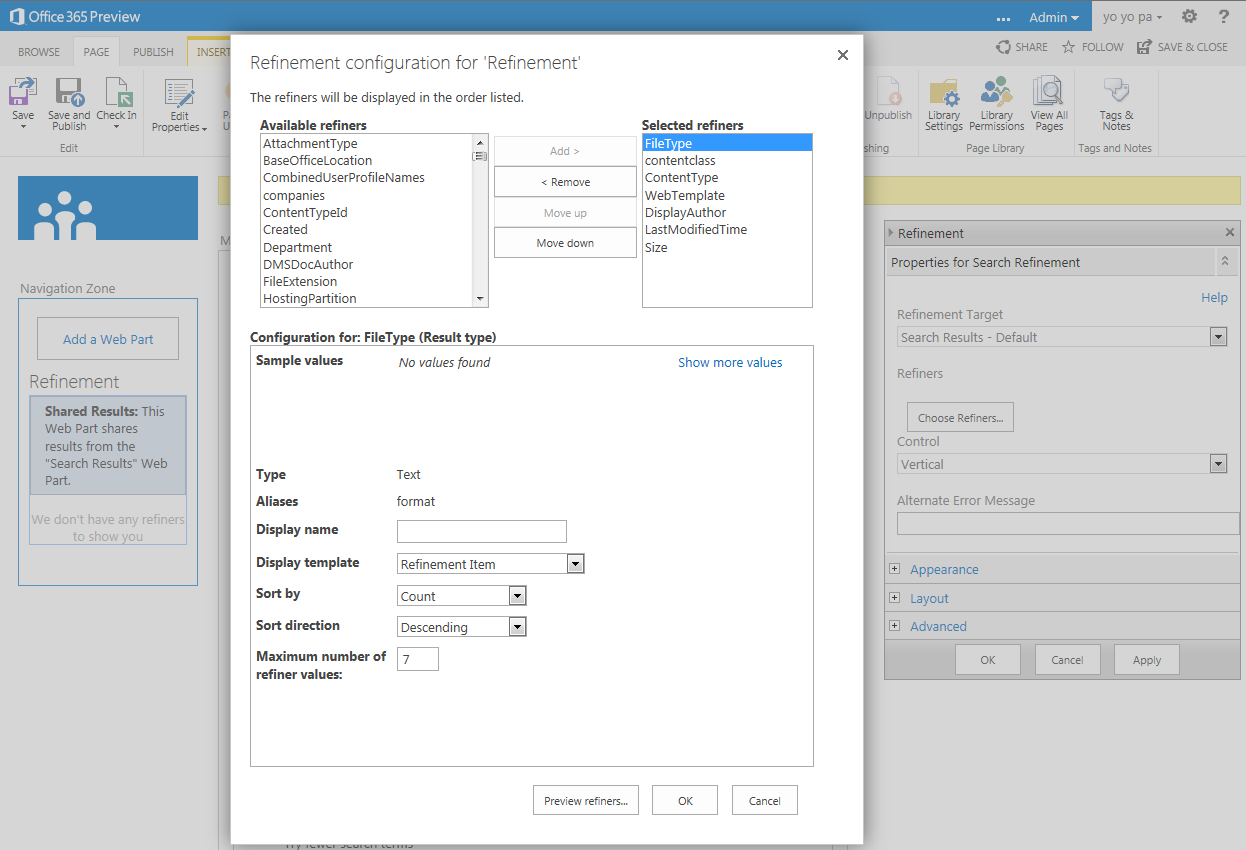
Here is a preview of the Refinement panel in SharePoint 2013. Custom refiners can be added through the user interface:


Display of the refiners in the search results page:


This impression is based on an Office 365 Developer Site.

Tuesday, June 5, 2012

Search Refinement Panel is not so MUI after all

"Out of the box SharePoint 2010 offers a search refinement panel that works great as long as you don’t use multiple languages. After some testing with search and the refinement panel I noticed that the Managed Metadata wasn’t changing when I was switching languages."
Ventigrate offers a MUI Search Refinement Panel on CodePlex.
Read more on Timmy Gilissen's blog: http://www.moss2007.be/blogs/timmy/archive/2011/12/13/mui-refinement-panel.aspx

Wednesday, February 29, 2012

Select multiple Refiners via the UI with xsl & js (part 2)

Just by extending the XSL of the Refinement Panel and adding a little javascript it is possible to select multiple Refiners via the UI:


After selection of multiple Refiners:


Add the following javascript to the Search results page:
<script type="text/javascript">
function Filter(url)
{
var inputs = document.getElementsByTagName("input");
var idValues = [];
for (var i = 0; i < inputs.length; i++) {   
  if ((inputs[i].type == "checkbox") && (inputs[i].checked)) {
idValues.push((GetUrlKeyValue("r",false,inputs[i].value)).substr((GetUrlKeyValue("r",false,url)).length));
}}
window.location = SP.Utilities.UrlBuilder.replaceOrAddQueryString(url, "r", GetUrlKeyValue("r",false,url)+decodeURI(idValues.toString().replace(/\,/g,"%20")));
}
</script>
(2012-03-01) Correction: changed the boolean value in all three GetUrlKeyValue functions to false.

Extend the XSL of the Filterlink template in the Refinement Panel web part:
  <xsl:template name="FilterLink">
    <xsl:param name="Url"/>
    <xsl:param name="UrlTooltip"/>
    <xsl:param name="Value"/>
    <xsl:param name="FilterSelection"/>
    <xsl:param name="ShowCounts"/>
    <xsl:param name="Count"/>
    <xsl:param name="Percentage"/>
    <xsl:param name="Indentation"/>
    <!-- HW -->
    <xsl:param name="ManagedProperty" />
    <!-- HW -->
    <xsl:variable name="SecureUrl">
      <xsl:call-template name="GetSecureUrl">
        <xsl:with-param name="Url" select="$Url" />
      </xsl:call-template>
    </xsl:variable>
    <li class="ms-searchref-filter {$FilterSelection}">
      <xsl:if test="($Indentation = '1')">
        <span class="ms-searchref-indenticon">&#8627;&#160;</span>
      </xsl:if>
      <!-- HW -->
      <xsl:if test="($ManagedProperty = 'Author' or $ManagedProperty = 'FileExtension') and $FilterSelection != 'ms-searchref-unselected' and not(starts-with($Value, 'Any '))">
        <input name="{$Value}" type="checkbox" align="center" title="OR {$Value}" value="{$SecureUrl}" checked="yes" />
      </xsl:if>
      <xsl:if test="($ManagedProperty = 'Author' or $ManagedProperty = 'FileExtension') and $FilterSelection = 'ms-searchref-unselected' and not(starts-with($Value, 'Any '))">
        <input name="{$Value}" type="checkbox" align="center" title="OR {$Value}" value="{$SecureUrl}" />
      </xsl:if>
      <xsl:choose>
        <xsl:when test="(starts-with($Value, 'Any Result Type') or starts-with($Value, 'Any Author')) and $FilterSelection != 'ms-searchref-unselected'">
          <a href="javascript:Filter('{$SecureUrl}')"><img align="absmiddle" src="/_layouts/images/filter.gif" border="0" title="Join selected Refiners"/></a>
        </xsl:when>
        <xsl:when test="(starts-with($Value, 'Any Result Type') or starts-with($Value, 'Any Author')) and $FilterSelection = 'ms-searchref-unselected'">
          <a href="{$SecureUrl}"><img align="absmiddle" src="/_layouts/images/filteroff.gif" border="0" title="Reset selected Refiners"/></a>
        </xsl:when>
        <xsl:when test="starts-with($Value, 'Any ')">
          <img align="absmiddle" src="/_layouts/images/asterisk.png" border="0" />
        </xsl:when>
        <xsl:when test="$ManagedProperty = 'SiteName'">
          <a href="http://{$Value}" target="_blank" title="Open site in new window"><img align="absmiddle" src="/_layouts/images/SharePointFoundation16.png" border="0" /></a>
        </xsl:when>
        <xsl:when test="ddwrt:MapToIcon('', $Value) != 'icgen.gif'">
          <img align="absmiddle" src="/_layouts/images/{ddwrt:MapToIcon('', $Value)}" border="0" />
        </xsl:when>
        <xsl:when test="$Value = 'Word'">
          <img align="absmiddle" src="/_layouts/images/icdocx.png" border="0" />
        </xsl:when>
        <xsl:when test="$Value = 'Excel'">
          <img align="absmiddle" src="/_layouts/images/icxlsx.png" border="0" />
        </xsl:when>
        <xsl:when test="$Value = 'PowerPoint'">
          <img align="absmiddle" src="/_layouts/images/icpptx.gif" border="0" />
        </xsl:when>
        <xsl:when test="$Value = 'Webpage'">
          <img align="absmiddle" src="/_layouts/images/icaspx.gif" border="0" />
        </xsl:when>
        <xsl:when test="$ManagedProperty = 'Author'">
          <a href="/SearchCenter/Pages/peopleresults.aspx?k={$Value}" target="_blank" title="Search for user profile"><img align="absmiddle" src="/_layouts/images/ACA16.gif" border="0" /></a>
        </xsl:when>
        <xsl:otherwise>
          <img align="absmiddle" src="/_layouts/images/{$Value}.gif" onError="this.src='/_layouts/images/bullet.gif';" border="0" />
        </xsl:otherwise>
      </xsl:choose>
      <xsl:text> </xsl:text>
      <!-- HW -->
      <a class="ms-searchref-filterlink" href="{$SecureUrl}" title="{$RefineByHeading}: {$UrlTooltip}">
        <xsl:value-of select="Value"/>
      </a>
      <xsl:choose>
        <xsl:when test="($ShowCounts = 'Count') and ($Count != '')">
          <span class="ms-searchref-count">
            <xsl:if test="$IsRTL = 'True'">&#x200f;</xsl:if> 
            (<xsl:value-of select="Count"/>)
          </span>
        </xsl:when>
        <xsl:when test="($ShowCounts = 'Percentage') and ($Percentage != '')">
          <span class="ms-searchref-count">
            <xsl:if test="$IsRTL = 'True'">&#x200f;</xsl:if> 
            (<xsl:value-of select="format-number($Percentage, '0%')"/>)
          </span>
        </xsl:when>
      </xsl:choose>
    </li>
  </xsl:template>

That's all folks!

Notice: The Display Language should be English, because I check for the word 'Any' in the XSL. You can/should adjust this by yourself in rows 30, 33, 36 for your preferred language.

Zip file with two webparts:
- HTML Form Web Part.dwp with navigation and the javascript;
- Refinement Panel.webpart with the extended XSL and customized categories.
Add the web parts to the Left Zone in the Search results page, and remove the original Refinement Panel web part.

References:
- See how to propagate the ManagedProperty parameter;
- Working with URLs in SharePoint 2010 JavaScripts;
- Helpful SharePoint JavaScript functions.

Wednesday, February 22, 2012

Select multiple Refiners in the same category (part 1)

The selection of multiple Refiners in the same category is possible out of the box.


For instance if we select the Word refiner in the Result Type category it will show us the following url:

According to the Keyword Query Syntax Reference Multiple Property Restrictions work like this: When you use multiple instances of the same property restriction, matches are based on the union of the property restrictions in the keyword query. This is functionally the same as using the OR Boolean operator.
So if we just add "%20fileextension%3D%22pdf%22" to the URL it will get us Word OR Pdf documents as a result.


The nice thing is that the XSL recognizes both refiners as selected.


Even the deselection of a selected refiner is working.
In this case, if we would deselect the Word refiner, the url is correct:
http://sp2010/SearchCenter/Pages/results.aspx?k=sharepoint&r=fileextension%3D%22pdf%22
But on the other hand if we would deselect the Pdf refiner the logic is broken. When multiple instances of the same property are used -like Word- the url is not correctly processed: the spaces (OR) are replaced by AND. This will show us no results of course.

Another example of selection of multiple refiners is with the Author category. The author can/will show us 2 names: the original author from the document property, and the one that created the document (by upload).


First we select the original author of the document.

Then we select the creator of the document.


The deselection of a selected author is working fine.

Conclusion:
So the selection of multiple refiners in the same category is possible but the UI doesn't provide the full and correct navigation for it.

In part 2 I will try to overcome this.

Tuesday, December 20, 2011

The Ugly, the Bad and the Good (part 4)

Part 4. Revisited

I was still not satisfied with the possibilities I came up with to get the right icon for every filter value in the Refinement panel.
I wanted to be able to add a specific icon to the Refiner values belonging to the Filter category 'Author' for instance.

Therefore I had to promote the ManagedProperty parameter, so its value would be available in the FilterLink template.

Here is the complete XSL that can replace the original one. Add this via the XSL Editor of the Refinement Panel webpart:

<?xml version="1.0" encoding="utf-8"?>
<xsl:stylesheet version="1.0" xmlns:xsl="http://www.w3.org/1999/XSL/Transform" xmlns:ddwrt="http://schemas.microsoft.com/WebParts/v2/DataView/runtime">
  <xsl:output method="xml" indent="no"/>
  <xsl:param name="RefinementPanelCaption"></xsl:param>
  <xsl:param name="QueryId"></xsl:param>
  <xsl:param name="TagsCategoryId"></xsl:param>
  <xsl:param name="MetadataServiceUrl"></xsl:param>
  <xsl:param name="IsUIRightToLeft"></xsl:param>
  <xsl:param name="ApplyButtonText"></xsl:param>
  <xsl:param name="CancelButtonText"></xsl:param>
  <xsl:param name="CurrentLcid"></xsl:param>
  <xsl:param name="MoreLinkPanelIDSuffix"></xsl:param>
  <xsl:param name="IdPrefix" />
  <xsl:param name="IsDesignMode">True</xsl:param>
  <xsl:param name="RefineByHeading">Refinement</xsl:param>
  <xsl:param name="IsRTL">False</xsl:param>

  <xsl:template match="FilterPanel">
    <xsl:variable name="FilterCategories" select="FilterCategory" />
    <xsl:variable name="CategoryCount" select="count($FilterCategories)" />
    <xsl:if test="($CategoryCount &gt; 0)">
      <xsl:call-template name="FilterCategory">
        <xsl:with-param name="Categories" select="$FilterCategories" />
      </xsl:call-template>
    </xsl:if>
  </xsl:template>

  <xsl:template name="FilterCategory">
    <xsl:param name="Categories" />
    <xsl:if test="$RefinementPanelCaption != ''">
      <div class="ms-searchref-caption">
        <xsl:value-of select="$RefinementPanelCaption" />
      </div>
    </xsl:if>
    <xsl:for-each select="$Categories">
      <xsl:variable name="FilterCategoryId" select="concat(@Id,$IdPrefix)"/> 
      <xsl:variable name="TagsId" select="concat($TagsCategoryId,$IdPrefix)"/> 
      <xsl:variable name="ColumnId" select="substring(@Id,10)"/> 
      <xsl:variable name="FilterCategoryType" select="@Type"/> 
      <xsl:variable name="ManagedProperty" select="@ManagedProperty"/>
      <xsl:variable name="SSPList" select="substring-before(CustomData/AssociateTermSets, '|')"/>
      <xsl:variable name="TermSetList" select="substring-after(CustomData/AssociateTermSets, '|')"/>
      <xsl:variable name="ShowMoreLink" select="translate(@ShowMoreLink,'abcdefghijklmnopqrstuvwxyz','ABCDEFGHIJKLMNOPQRSTUVWXYZ')"/> 
      <xsl:variable name="FreeFormFilterHint" select="@FreeFormFilterHint"/> 
      <xsl:variable name="MoreLinkText" select="@MoreLinkText"/> 
      <xsl:variable name="LessLinkText" select="@LessLinkText"/> 
      <xsl:variable name="ShowCounts" select="@ShowCounts"/> 
      <xsl:variable name="DisplayName" select="@DisplayName"/>   
      <xsl:variable name="EscapedDisplayName" select="CustomData/EscapedDisplayName"/>   
      <xsl:variable name="ShowTaggingControl" select="@ShowTaggingControl"/>   
      <div class="ms-searchref-categoryname">
        <xsl:value-of select="$DisplayName"/>
      </div>
      <ul class="ms-searchref-filters" id="TopFilters_{$FilterCategoryId}">
        <xsl:choose>
          <xsl:when test="$FilterCategoryType = 'Message'">
            <xsl:for-each select="Filters/Filter">
              <xsl:call-template name="FilterMessage">
                <xsl:with-param name="Value" select="Value" />
              </xsl:call-template>
            </xsl:for-each>
          </xsl:when>
          <xsl:otherwise>
            <xsl:call-template name="Filter">
              <xsl:with-param name="Filters" select="Filters/Filter" />
              <xsl:with-param name="ShowCounts" select="$ShowCounts" />
    <!-- HW: Begin -->
    <xsl:with-param name="ManagedProperty" select="$ManagedProperty" />
    <!-- HW: End -->
            </xsl:call-template>
          </xsl:otherwise>
        </xsl:choose>
      </ul>
        <xsl:if test="$ShowMoreLink='TRUE'">
          <xsl:variable name="MoreFilters" select="MoreFilters/Filter" />
          <xsl:choose>
            <xsl:when test="$FilterCategoryId and ($FilterCategoryId != '') and ($FilterCategoryType = 'Microsoft.Office.Server.Search.WebControls.ManagedPropertyFilterGenerator')">
              <xsl:variable name="MoreDivId" select="concat('RefinementMore_', $QueryId, $FilterCategoryId)" />
              <xsl:variable name="LessDivId" select="concat('RefinementLess_', $QueryId, $FilterCategoryId)" />
              <xsl:if test="$MoreFilters != ''">
                <a class="ms-searchref-more" href="javascript:{{}}" onclick="SearchEnsureSOD();ToggleRefMoreLessFilters(this, true);">
                  <div class="ms-searchref-morelink">
                    <xsl:value-of select="$MoreLinkText" />
                    <xsl:text disable-output-escaping="yes">&amp;nbsp;</xsl:text>
                    <img src="/_layouts/images/more_arrow.png" class="ms-searchref-moreicon" />
                  </div>
                </a>
                <ul class="ms-searchref-filters" id="MoreFilters_{$FilterCategoryId}" style="display:none">
                  <xsl:call-template name="Filter">
                    <xsl:with-param name="Filters" select="$MoreFilters" />
                    <xsl:with-param name="ShowCounts" select="$ShowCounts" />
     <!-- HW: Begin -->
     <xsl:with-param name="ManagedProperty" select="$ManagedProperty" />
     <!-- HW: End -->
                  </xsl:call-template>
                </ul>
                <a class="ms-searchref-more" href="javascript:{{}}" onclick="SearchEnsureSOD();ToggleRefMoreLessFilters(this, false);" style="display:none">
                  <div class="ms-searchref-morelink">
                    <xsl:value-of select="$LessLinkText" />
                    <xsl:text disable-output-escaping="yes">&amp;nbsp;</xsl:text>
                    <img src="/_layouts/images/less_arrow.png" class="ms-searchref-moreicon" />
                  </div>
                </a>
              </xsl:if>
            </xsl:when>
            <xsl:when test="$FilterCategoryId and ($FilterCategoryId != '') and ($FilterCategoryType = 'Microsoft.Office.Server.Search.WebControls.TaxonomyFilterGenerator')">
              <xsl:variable name="IsTagsColumn" select="$FilterCategoryId = $TagsId" />
              <xsl:if test="$MoreFilters != ''">
                <a id="{$MoreLinkPanelIDSuffix}_{$FilterCategoryId}" href="javascript:{{}}" class="ms-searchref-more" onclick="SearchEnsureSOD();RenderTaggingControl('{$FilterCategoryId}', {$IsTagsColumn}, '{$SSPList}', '{$TermSetList}', '{$MetadataServiceUrl}', {$CurrentLcid}, '{$MoreLinkPanelIDSuffix}', '{$EscapedDisplayName}', {$ShowTaggingControl}, {$IsUIRightToLeft});">
                  <div class="ms-searchref-morelink">
                    <xsl:value-of select="$MoreLinkText" />
                    <xsl:text disable-output-escaping="yes">&amp;nbsp;</xsl:text>
                    <img src="/_layouts/images/more_arrow.png" class="ms-searchref-moreicon" />
                  </div>
                </a>
                <div style="display:none">
                  <ul class="ms-searchref-filters" id="MoreFilters_{$FilterCategoryId}">
                    <xsl:call-template name="Filter">
                      <xsl:with-param name="Filters" select="MoreFilters/Filter" />
                      <xsl:with-param name="ShowCounts" select="$ShowCounts" />
                    </xsl:call-template>
                  </ul>
                  <div id="TaxonomyMoreControl_{$FilterCategoryId}">
                    <input id="MetadataHiddenInput_{$FilterCategoryId}" type="hidden" />
                    <div id="TaggingControl_{$FilterCategoryId}" class="ms-taxonomy">
                        <img alt="" src="/_layouts/images/blank.gif" height="0" width="0"/>
                    </div>
                    <img style="display:none" src="/_layouts/images/RTE2FIND.gif" class="ms-searchref-taxapply" align="right" alt="{$ApplyButtonText}" onclick="SearchEnsureSOD();var link=GetTaxonomyApplyFilterUrl('{$FilterCategoryId}','{$ColumnId}');if (link!='')window.location=link;" />
                  </div>
                </div>
                <a style="display:none" class="ms-searchref-more" href="javascript:{{}}" onclick="SearchEnsureSOD();ToggleTaxonomyLessFilters(this);">
                  <div class="ms-searchref-morelink">
                    <xsl:value-of select="$LessLinkText" />
                    <xsl:text disable-output-escaping="yes">&amp;nbsp;</xsl:text>
                    <img src="/_layouts/images/less_arrow.png" class="ms-searchref-moreicon" />
                  </div>
                </a>
              </xsl:if>
            </xsl:when>
            <xsl:when test="$FilterCategoryId and ($FilterCategoryId != '') and ($FilterCategoryType = 'Message')">
            </xsl:when>
            <xsl:otherwise>
            </xsl:otherwise>
          </xsl:choose>
        </xsl:if>
      <div class="ms-searchref-catseparator">&#160;</div>
    </xsl:for-each>
  </xsl:template>

  <xsl:template name="Filter">
    <xsl:param name="Filters" />
    <xsl:param name="ShowCounts" />
 <!-- HW: Begin -->
 <xsl:param name="ManagedProperty" />
 <!-- HW: End -->
    <xsl:for-each select="$Filters">
      <xsl:variable name="Selection" select="Selection" />
      <xsl:choose>
        <xsl:when test="($Selection = 'Selected')">
          <xsl:call-template name="FilterLink">
            <xsl:with-param name="Url" select="Url" />
            <xsl:with-param name="UrlTooltip" select="Tooltip" />
            <xsl:with-param name="Value" select="Value" />
            <xsl:with-param name="FilterSelection" select="'ms-searchref-selected ms-searchref-removable'" />
            <xsl:with-param name="ShowCounts" select="$ShowCounts" />
            <xsl:with-param name="Count" select="Count" />
            <xsl:with-param name="Percentage" select="Percentage" />
            <xsl:with-param name="Indentation" select="Indentation" />
   <!-- HW: Begin -->
   <xsl:with-param name="ManagedProperty" select="$ManagedProperty" />
   <!-- HW: End -->
          </xsl:call-template>
        </xsl:when>
        <xsl:when test="($Selection = 'Implied')">
          <xsl:call-template name="FilterLink">
            <xsl:with-param name="Url" select="Url" />
            <xsl:with-param name="UrlTooltip" select="Tooltip" />
            <xsl:with-param name="Value" select="Value" />
            <xsl:with-param name="FilterSelection" select="'ms-searchref-selected'" />
            <xsl:with-param name="ShowCounts" select="$ShowCounts" />
            <xsl:with-param name="Count" select="Count" />
            <xsl:with-param name="Percentage" select="Percentage" />
            <xsl:with-param name="Indentation" select="Indentation" />
   <!-- HW: Begin -->
   <xsl:with-param name="ManagedProperty" select="$ManagedProperty" />
   <!-- HW: End -->
          </xsl:call-template>
        </xsl:when>
        <xsl:otherwise>
          <xsl:call-template name="FilterLink">
            <xsl:with-param name="Url" select="Url" />
            <xsl:with-param name="UrlTooltip" select="Tooltip" />
            <xsl:with-param name="Value" select="Value" />
            <xsl:with-param name="FilterSelection" select="'ms-searchref-unselected'" />
            <xsl:with-param name="ShowCounts" select="$ShowCounts" />
            <xsl:with-param name="Count" select="Count" />
            <xsl:with-param name="Percentage" select="Percentage" />
            <xsl:with-param name="Indentation" select="Indentation" />
   <!-- HW: Begin -->
   <xsl:with-param name="ManagedProperty" select="$ManagedProperty" />
   <!-- HW: End -->
          </xsl:call-template>
        </xsl:otherwise>
      </xsl:choose>
    </xsl:for-each>
  </xsl:template>

  <xsl:template name="FilterLink">
    <xsl:param name="Url"/>
    <xsl:param name="UrlTooltip"/>
    <xsl:param name="Value"/>
    <xsl:param name="FilterSelection"/>
    <xsl:param name="ShowCounts"/>
    <xsl:param name="Count"/>
    <xsl:param name="Percentage"/>
    <xsl:param name="Indentation"/>
 <!-- HW: Begin -->
 <xsl:param name="ManagedProperty" />
 <!-- HW: End -->
    <xsl:variable name="SecureUrl">
      <xsl:call-template name="GetSecureUrl">
        <xsl:with-param name="Url" select="$Url" />
      </xsl:call-template>
    </xsl:variable>
    <li class="ms-searchref-filter {$FilterSelection}">
      <xsl:if test="($Indentation = '1')">
        <span class="ms-searchref-indenticon">&#8627;&#160;</span>
      </xsl:if>
   <!-- HW: Begin -->
      <xsl:choose>
        <xsl:when test="starts-with($Value, 'Any ')">
          <img align="absmiddle" src="/_layouts/images/asterisk.png" border="0" />
        </xsl:when>
        <xsl:when test="$ManagedProperty = 'SiteName'">
          <a href="http://{$Value}" target="_blank" title="Open site in new window"><img align="absmiddle" src="/_layouts/images/SharePointFoundation16.png" border="0" /></a>
        </xsl:when>
        <xsl:when test="ddwrt:MapToIcon('', $Value) != 'icgen.gif'">
          <img align="absmiddle" src="/_layouts/images/{ddwrt:MapToIcon('', $Value)}" border="0" />
        </xsl:when>
        <xsl:when test="$Value = 'Word'">
          <img align="absmiddle" src="/_layouts/images/icdocx.png" border="0" />
        </xsl:when>
        <xsl:when test="$Value = 'Excel'">
          <img align="absmiddle" src="/_layouts/images/icxlsx.png" border="0" />
        </xsl:when>
        <xsl:when test="$Value = 'PowerPoint'">
          <img align="absmiddle" src="/_layouts/images/icpptx.gif" border="0" />
        </xsl:when>
        <xsl:when test="$Value = 'Webpage'">
          <img align="absmiddle" src="/_layouts/images/icaspx.gif" border="0" />
        </xsl:when>
  <xsl:when test="$ManagedProperty = 'Author'">
    <a href="http://sp2010/SearchCenter/Pages/peopleresults.aspx?k={$Value}" target="_blank" title="Search for user profile"><img align="absmiddle" src="/_layouts/images/ACA16.gif" border="0" /></a>
        </xsl:when>
        <xsl:otherwise>
          <img align="absmiddle" src="/_layouts/images/{$Value}.gif" onError="this.src='/_layouts/images/bullet.gif';" border="0" />
        </xsl:otherwise>
      </xsl:choose>
      <xsl:text> </xsl:text>
   <!-- HW: End -->
      <a class="ms-searchref-filterlink" href="{$SecureUrl}" title="{$RefineByHeading}: {$UrlTooltip}">
        <xsl:value-of select="Value"/>
      </a>
      <xsl:choose>
        <xsl:when test="($ShowCounts = 'Count') and ($Count != '')">
          <span class="ms-searchref-count">
            <xsl:if test="$IsRTL = 'True'">&#x200f;</xsl:if> 
            (<xsl:value-of select="Count"/>)
          </span>
        </xsl:when>
        <xsl:when test="($ShowCounts = 'Percentage') and ($Percentage != '')">
          <span class="ms-searchref-count">
            <xsl:if test="$IsRTL = 'True'">&#x200f;</xsl:if> 
            (<xsl:value-of select="format-number($Percentage, '0%')"/>)
          </span>
        </xsl:when>
      </xsl:choose>
    </li>
  </xsl:template>

  <xsl:template name="FilterMessage">
    <xsl:param name="Value"/>
    <xsl:param name="FilterSelection"/>
    <li class="ms-searchref-filtermsg">
      <span class="ms-searchref-filterlink ms-searchref-msg">
        <xsl:value-of select="Value"/>
      </span>
    </li>
  </xsl:template>

  <xsl:template name="GetSecureUrl">
    <xsl:param name="Url"/>
    <xsl:choose>
      <xsl:when test="$IsDesignMode = 'True'">
        <xsl:value-of select="$Url" />
      </xsl:when>
      <xsl:otherwise>
        <xsl:value-of select="ddwrt:EnsureAllowedProtocol($Url)" />
      </xsl:otherwise>
    </xsl:choose>
  </xsl:template>

</xsl:stylesheet>

The result is a Refinement Panel with icons, where a hyperlink is added to the icons of the Filter categories 'Site' and 'Author':
- Site: Open site in new window
- Author: hyperlink to a people search results page with a TOP Federated Results webpart, that includes the local people search and an internet people search via the api of linkedin, pipl, etc.
Replace the url in row 253 with the url of your own search center.


Example of custom refiner with custom icons (with same file name as the value).


Wish list:
- Display avatar of the authors: due to the lack of e-mail address and MD5 encoding this is difficult to achieve;
- Show user profile on hoover with javascript/jQuery: be my guest. => There is a solution for this in SP2013/Online made by Elio Struyf: People refinement made easy by adding profile pictures.


I managed to make it possible to select multiple Refiners via the UI, just by extending the XSL of the Refinement Panel and adding a little javascript.

Friday, August 26, 2011

The Ugly, the Bad and the Good (Part 3)


Part 3. The Good

Different ways to get the right icon for every filter value in the Refinement panel.

After exploring the possibilities in XSL I came up with this hybrid approach:
- Look for Result Type icons in the docicon.xml file on the server;
- Look for icons with the same name as the filter value in the images folder;
- Several when-statements for specific matches;
- Default icon if there's no match.

Add via the XSL Editor the following rows to the <xsl:template name="FilterLink">:

<xsl:if test="($Indentation = '1')">
  <span class="ms-searchref-indenticon">&#8627;&#160;</span>
</xsl:if>
<!-- Begin -->
  <xsl:choose>
 <!-- for the Any of every category -->
 <xsl:when test="starts-with($Value, 'Any ')">
   <img align="absmiddle" src="/_layouts/images/asterisk.png" border="0" />
 </xsl:when>
 <!-- for Site -->
 <xsl:when test="starts-with($UrlTooltip, 'http://')">
   <img align="absmiddle" src="/_layouts/images/SharePointFoundation16.png" border="0" />
 </xsl:when>
 <!-- for Result Type - will only work for original values, like Pdf, Zip -->
 <xsl:when test="ddwrt:MapToIcon('', $Value) != 'icgen.gif'">
   <img align="absmiddle" src="/_layouts/images/{ddwrt:MapToIcon('', $Value)}" border="0" />
 </xsl:when>
 <!-- for Result Type with custom value -->
 <xsl:when test="$Value = 'Word'">
   <img align="absmiddle" src="/_layouts/images/icdocx.png" border="0" />
 </xsl:when>
 <xsl:when test="$Value = 'Excel'">
   <img align="absmiddle" src="/_layouts/images/icxlsx.png" border="0" />
 </xsl:when>
 <xsl:when test="$Value = 'PowerPoint'">
   <img align="absmiddle" src="/_layouts/images/icpptx.gif" border="0" />
 </xsl:when>
 <xsl:when test="$Value = 'Webpage'">
   <img align="absmiddle" src="/_layouts/images/icaspx.gif" border="0" />
 </xsl:when>
 <!-- find your own added icons with same name as the filter value, or else default icon  -->
 <xsl:otherwise>
   <img align="absmiddle" src="/_layouts/images/{$Value}.gif" onError="this.src='/_layouts/images/bullet.gif';" border="0" />
 </xsl:otherwise>
  </xsl:choose>
  <!-- space -->
  <xsl:text> </xsl:text>
<!-- End -->
<a class="ms-searchref-filterlink" href="{$SecureUrl}" title="{$RefineByHeading}: {$UrlTooltip}">
  <xsl:value-of select="Value"/>
</a>

The result is this pimped up Refinement Panel:


Try it yourself.

Of course it's possible to add separate templates for every category, but that is too much work for now. Maybe later... See Part 4.


The Ugly, the Bad and the Good (Part 2)


Part 2. The Bad

Add your own icons with the same name as the refiner value to the images folder.

Only one extra row of XSL is needed to do the trick: find and show the icon with the filter value in the Refinement panel.

Add via the XSL Editor the following rows to the <xsl:template name="FilterLink">:

<xsl:if test="($Indentation = '1')">
  <span class="ms-searchref-indenticon">&#8627;&#160;</span>
</xsl:if>
<!-- Begin -->
  <!-- find your own added icons with same name as the filter value, or else default icon  -->
  <img align="absmiddle" src="/_layouts/images/{$Value}.gif" onError="this.src='/_layouts/images/bullet.gif';" border="0" />
  <!-- space -->
  <xsl:text> </xsl:text>
<!-- End -->
<a class="ms-searchref-filterlink" href="{$SecureUrl}" title="{$RefineByHeading}: {$UrlTooltip}">
  <xsl:value-of select="Value"/>
</a>

But there must be a smarter way to get the standard icons that are already available. The sequel continues with Part 3.

Saturday, August 20, 2011

The Ugly, the Bad and the Good (Part 1)


Part 1. The Ugly

Let's bring back the icons in the Refinement Panel of the Search results, as with the Faceted Search in MOSS 2007.
Within the Refinement Panel we have the value of the filters available. By extending the XSLT with a lot of when-statements we are able to select the belonging icon from the images folder at the file system of the server.

Add via the XSL Editor the following rows to the <xsl:template name="FilterLink"> between Begin and End comment:

<xsl:if test="($Indentation = '1')">
  <span class="ms-searchref-indenticon">&#8627;&#160;</span>
</xsl:if>
<!-- Begin -->
<xsl:choose>
  <xsl:when test="contains($Value, 'Any')">
    <img align="absmiddle" src="/_layouts/images/asterisk.png" border="0" />
  </xsl:when>
  <xsl:when test="$Value = 'Word'">
    <img align="absmiddle" src="/_layouts/images/icdocx.png" border="0" />
  </xsl:when>
  <xsl:when test="$Value = 'Excel'">
    <img align="absmiddle" src="/_layouts/images/icxlsx.png" border="0" />
  </xsl:when>
  <xsl:when test="$Value = 'Webpage'">
    <img align="absmiddle" src="/_layouts/images/icaspx.gif" border="0" />
  </xsl:when>
  <xsl:when test="$Value = 'Adobe PDF'">
    <img align="absmiddle" src="/_layouts/images/icpdf.gif" border="0" />
  </xsl:when>
  <xsl:otherwise>
    <img align="absmiddle" src="/_layouts/images/bullet.gif" border="0" />
  </xsl:otherwise>
</xsl:choose>
<xsl:text> </xsl:text>
<!-- End -->
<a class="ms-searchref-filterlink" href="{$SecureUrl}" title="{$RefineByHeading}: {$UrlTooltip}">
  <xsl:value-of select="Value"/>
</a>
Of course this is quite an ugly solution due to the fact that you need to add rows for 'every' result type that you might expect.
But it's a quick win and looks very nice. And because of the otherwise-statement, every filter gets at least an icon and no red cross or so.

Here is an example of the result:


In Part 2. we will look at the possibility to use the value of the filter to compose the filename of the icon. In this way we don't need all the when-statements. As you might think, this is the Bad one.

Friday, August 19, 2011

Get back to where you once belonged

My first post will be about getting back the icons where they once belonged:

Next to the Search Refiners in SharePoint 2010,
as with the Faceted Search in MOSS 2007.

Search Refiners (SharePoint 2010)Faceted Search (MOSS 2007)